How to Place a Prediction
Step-by-Step Walkthrough
1. Market Header
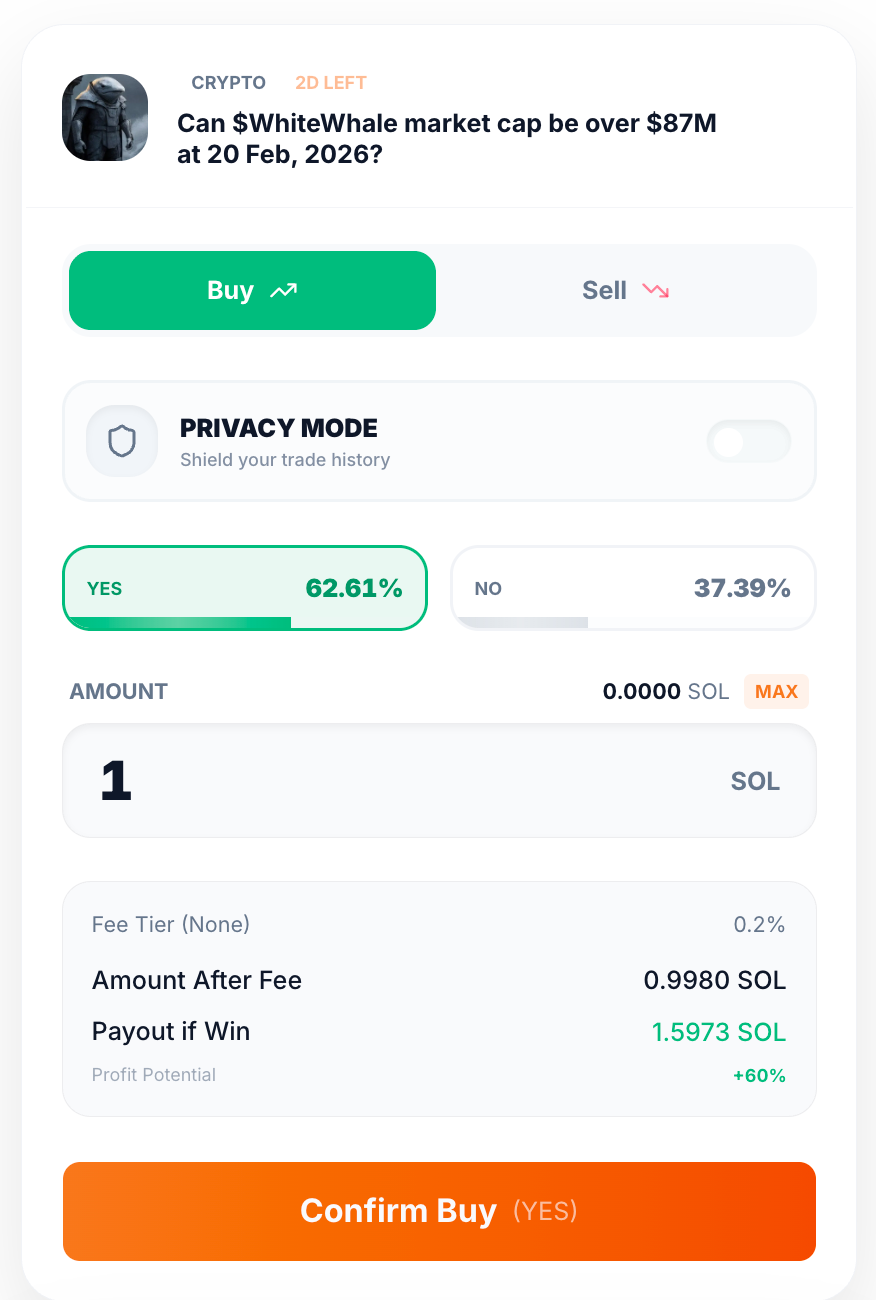
At the top of the Order Ticket, you will see the market you are about to trade on:
- Category — The market type (e.g., CRYPTO, Politics, Sports).
- Time Left — How much time remains before the market expires (e.g., "2D LEFT").
- Market Question — The specific condition being predicted (e.g., "Can $WhiteWhale market cap be over $87M at 20 Feb, 2026?").
2. Buy or Sell
Choose the action you want to take:
- Buy — Open a new position. Select this when you want to enter the market.
- Sell — Close or reduce an existing position. Select this when you already hold shares and want to exit.
3. Privacy Mode
Below the Buy/Sell toggle, you will see the Privacy Mode switch.
- When off, your prediction is processed as a standard public transaction.
- When on, your trade is routed through Oyrade's Shielded Trading flow — your trade history and position details are encrypted and unlinkable to your wallet.
You can toggle this before placing any order. See Shielded Trading for details.
4. Select Outcome: Yes or No
Choose the direction of your prediction:
- Yes — You believe the condition will be met (e.g., market cap will be over $87M).
- No — You believe the condition will NOT be met.
The percentage displayed next to each outcome (e.g., 62.61% for Yes, 37.39% for No) represents the current implied probability based on market activity. A higher percentage means the market currently believes that outcome is more likely.
5. Enter Amount
Enter how much you want to spend on this prediction:
- Amount — The capital you are allocating, denominated in SOL.
- Balance — Your current available wallet balance is displayed (e.g., "0.0000 SOL").
- MAX — Click this to automatically fill the maximum amount you can trade.
6. Review Execution Details
Before confirming, review the breakdown at the bottom of the ticket:
- Fee Tier — Your current fee tier based on $OYRADE holdings. Displayed as "None" (0.2%) if you do not hold enough tokens for a discount. See Fees for tier details.
- Amount After Fee — The actual amount that will be used to purchase shares after the trading fee is deducted. For example, with a 0.2% fee on 1 SOL, the amount after fee is 0.9980 SOL.
- Payout if Win — The total amount you will receive if your selected outcome resolves correctly (e.g., 1.5973 SOL).
- Profit Potential — Your projected return on investment, shown as a percentage (e.g., +60%).
7. Confirm Your Prediction
Once you have reviewed all details, click the Confirm Buy (YES) or Confirm Buy (NO) button to submit your order.
- Your connected wallet will prompt you to approve the transaction.
- Once confirmed on-chain, your position becomes active and visible in your Portfolio.